How It Works

From connected accounts to a fully current financial picture.

Alphiniti Financial & Wealth Management runs on two connected tracks: the path your firm takes to launch a configured practice, and the path your clients take from a first connected account to a continuously monitored, drift-scored financial picture. Both are shown below, start to finish.
Integrated wealth coordination and legacy planning illustration
Consent-First Access Model
SOC2-Ready
Bank-Level Encryption
Full Audit Trails
MFA-Protected Access
By The Numbers
4-6
weeks
Typical practice onboarding timeline
8
modules
Core capabilities in one platform
Continuous
sync
Account data refresh, not quarterly statements
1
record
Per household, across every connected account
Track 1; For Your Firm

Setting up your practice

Click any step to see what happens in it. Each step depends on the last, so a numbered timeline is the right structure here, not decoration.

Step 1 of 5

Configure your practice

Map your billing schedules, fee tiers (AUM, flat, or hybrid), and model portfolios into Meridian.

Track 2; For Your Clients

What a client actually experiences

Tap through the five stages a client moves through, from first connected account to a picture that keeps monitoring itself for drift.

Step 1 of 5

Connect accounts

The client grants consent to link banking, investment, crypto, and retirement accounts; scoped, read-only, or time-limited if they choose.

Under The Hood

How data actually moves; and stays yours

Every connection is encrypted in transit and at rest, logged for audit, and governed by role-based access control; the same standard a compliance review or a client's own due diligence would expect to see. Hover or tap any node to trace its connections.
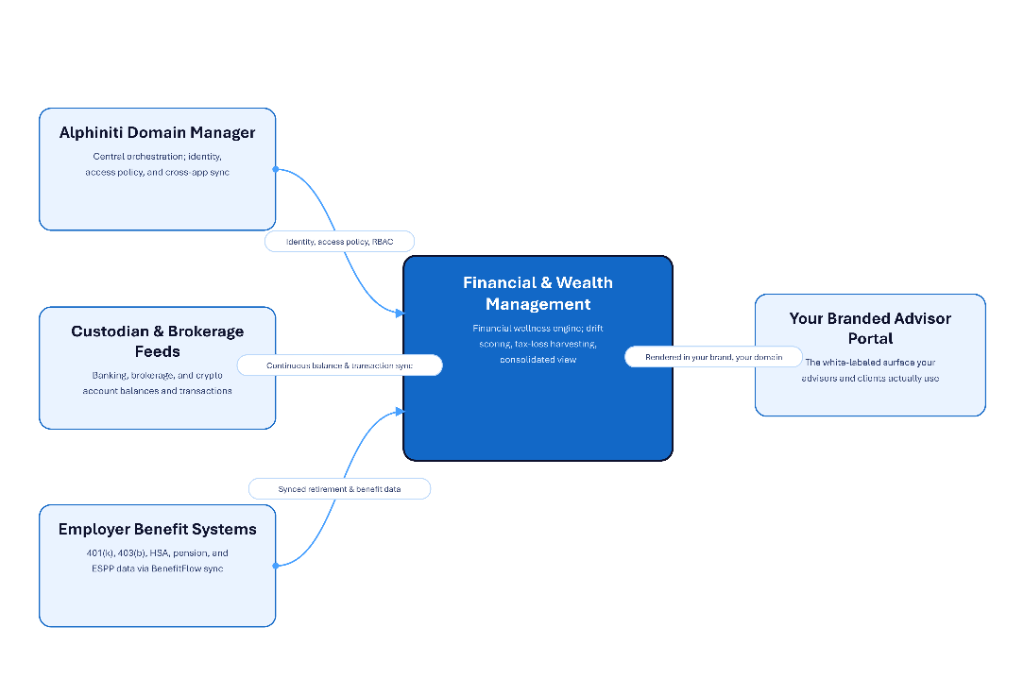
Financial & Wealth Management architecture: Alphiniti Domain Manager, Custodian & Brokerage Feeds, and Employer Benefit Systems flow into the Financial & Wealth Management engine, which renders to your branded Advisor Portal.
Common Questions

How specific pieces actually work

Meridian compares a client's current holdings against their assigned model portfolio and quantifies how far the allocation has wandered. When drift crosses a threshold, it's surfaced with a specific buy/sell recommendation, and the advisor can generate a rebalancing plan or run a what-if scenario before touching a single trade.

The platform continuously scans a client's taxable holdings for unrealized losses, estimates the potential tax savings, and checks for wash-sale conflicts before surfacing the opportunity. Advisors see it in a dedicated harvesting workspace across their whole book; clients see it in their own view at the same time.

A client links their own accounts and can scope exactly what's shared; read-only, time-limited, or account-specific; and can revoke access at any point. Nothing is aggregated behind the scenes without that explicit grant, which is the core difference from a portfolio-only platform pulling data through a custodian feed alone.

Typically 4 to 6 weeks from kickoff to go-live, covering practice configuration, connecting your existing systems through the Domain Manager, advisor invitations with role-based access, and rolling the client onboarding wizard out to your book. Timeline varies with how many systems you're integrating.

Access is permissioned per account and per person; a spouse, a family member, or a collaborating professional can be granted view-only, comment, or full access, configured individually rather than as an all-or-nothing household setting.

See the whole client. Not just the portfolio.

See it running on your own book of clients.

Request a design partner walkthrough and we'll show you the practice setup flow and the client journey side by side, using your own model portfolios as the example.

Request Design Partner Access